


Olympic Games™
3.51.23K Reviews
App Specs
- Version
- 11.8.0
- Updated On
- License
- Free
- Downloads
- 10,000,000+
- Developer
- IOC
- Categories
- Sports
- Platform
- Android, iOS
Screenshots



 Analysis by AppCompare
When a major Olympic event is on, I like having one place to check what is happening without turning the family chat into a stream of competing links. The official Olympic Games™ app is aimed at that kind of sports-following: it brings Olympic news, highlights and schedule information together, with Milano Cortina 2026 among its stated focuses. I see it as a useful companion for people who want to follow the Games at their own pace, rather than as a replacement for watching a full event.
A shared screen for Olympic moments
In a household, the appeal is practical. One person may want to know when a sport is on, another may be interested in a particular athlete or country, and someone else may just want a short recap after dinner. An official Olympic app can give those conversations a common starting point: check the schedule, browse sports news, then use highlights to catch up on moments you missed. That is a better fit for casual shared use than expecting everyone to follow the same live broadcast from beginning to end.
A realistic routine might be to look at the day’s schedule over breakfast, agree on one event to watch later, and use a highlight when work or school makes the timing impossible. I would treat the schedule as a planning aid, not a promise that everyone will be free at a precise moment. Household plans change, and a schedule is most useful when it helps you decide what is worth keeping an eye on before the day gets busy.
The app is free, and its Everyone age rating makes it approachable for a broad household audience. That does not mean every screen will suit every child equally: sports coverage can include serious competition and emotionally intense results. I would browse together with younger viewers if they are new to the Olympics, and use the app as a way to talk about sports and athletes rather than leaving a child to navigate all coverage alone.
Keeping personal interests separate
Shared-device use works best when expectations are simple. I would let each person choose what they want to look up, while avoiding the assumption that one person’s interests or settings automatically represent everyone else’s. If several people use the same phone or tablet, it is sensible to check whose preferences are active before relying on a tailored view or alert. The useful boundary here is a household habit, not an assumed family-control feature.
For a shared living-room screen, I would use the app for quick lookups and short viewing sessions, then move to whichever broadcast or video service the household normally uses for a complete event. That division avoids making one app responsible for every part of Olympic viewing. It also helps when a family member wants results and another wants to avoid spoilers: agree on whether the device is being used to check the schedule or to reveal outcomes before opening news and highlights.
One small but helpful workflow is to decide what you need before opening the app. If the goal is simply to find an event time, go straight to the schedule rather than browsing headlines that may reveal results. If you are catching up, approach highlights as a recap and accept that they may give away the outcome. Separating those two intentions is especially useful when people in the same home are watching at different times.
Worth Reading Before You Choose

EA SPORTS FC Mobile 26 Is a Bigger Football Game, but It Takes Time

Flipboard Shows What News Apps Must Do Beyond the Feed

Switching to Android Auto Means Rethinking Your Driving Routine

Google Calendar Makes a Crowded Week Easier to Manage

Ludo King Makes the Most of the Minutes Between Plans

Baby Panda World Brings Quick Play to Modern Phones, but Its Game Library Feels Busy
What it does well—and where to be cautious
The app’s strongest role is as an Olympic-specific information and highlights companion. General sports apps can be better when you want broad coverage across leagues and competitions; a broadcaster’s app is usually the more natural choice for watching a full live programme. Here, the value is having Olympic-related material gathered around the Games, including the schedule and news, rather than trying to serve every sport or viewing habit all year round.
That focus is also a trade-off. If you only want one event’s live broadcast, opening a general video or broadcaster app may get you to the viewing experience more directly. If you follow many sports throughout the year, a broader sports service may make more sense as your everyday hub. I would choose this app when Olympic context matters—what is on, what has happened, and which highlights are worth catching—not simply because I want a universal sports dashboard.
There is another practical distinction between information and viewing. Highlights help fill gaps, but they are not the same experience as seeing an entire contest unfold. They can be ideal for a quick catch-up on a commute or between chores, while someone who cares about tactics, build-up, or the atmosphere may prefer a full event elsewhere. I would use the app to decide what deserves more of my time, not assume every highlight can substitute for watching live.
The app is published by the IOC, which gives it a direct connection to Olympic coverage. Its average rating is 3.9 from around 33,000 ratings, alongside roughly 1,200 written reviews. I read those figures as a reason to approach it with balanced expectations: it is widely used, but a large audience does not mean every person will like the same layout, content mix, or pace of updates. My own test for usefulness would be whether it makes following the Games easier, not whether it replaces all other sports apps.
Choosing an age-appropriate way to follow
For adults and older children, the app can be a convenient prompt for conversation: why a sport’s schedule matters, how athletes prepare, or what makes a highlight memorable. For younger children, I would keep the first visit purposeful. Look up a sport together, pick a clip or news item that fits their interests, and then close the app rather than treating an open-ended scroll as the activity. That is a general device-use choice, not a claim that the app provides parental settings.
On a family device, account boundaries deserve the same common-sense care as on any app. I would not let a child make changes to someone else’s personal settings or assume that a shared device offers separate experiences for each person. If adults want different preferences, each person should check the app directly when using it. This keeps coordination straightforward without relying on controls the app may not provide.
The Everyone rating is a useful starting point, not a guarantee that every item will match every family’s preferences. News can include wins, losses and high-pressure competition, and a child may react differently to that than an adult. I would stay nearby for a first look, especially if the child is unfamiliar with competitive sport, then decide together which kinds of coverage feel right.
It is also worth thinking about spoiler etiquette. A person checking results on a shared device can unintentionally reveal them to someone planning to watch later. Before handing over a phone, I would say whether I have opened results or highlights, and anyone saving an event for later can ask the household to avoid discussing its outcome. A quick conversation can matter more than any setting when the main challenge is several people following at different times.
Setup, compatibility and everyday use
The app is free to download, so trying it does not require an upfront purchase. It was released on February 7, 2014, and the current version is 11.3.0; the stated minimum operating-system requirement is 7.0. Before installing on an older device, I would check its system version and available space, then consider whether the person using it can comfortably read and navigate the screens. A compatible device is only useful if it remains convenient in daily use.
Because the app covers current Olympic material, it is most worthwhile when there is a specific Games-related reason to open it. For instance, I might check the schedule before making evening plans, look for a news update during a break, and save highlights for a quieter moment. That three-step pattern keeps the app useful without encouraging constant checking. Someone who is not following the Olympics at all may find a general sports news app more relevant between major events.
For coordination, I would make one person the household’s informal schedule checker rather than having everyone repeatedly search for the same information. They can share the event time in a family conversation, while each person decides whether they want to watch or catch up later. This is not a special app function; it is simply a low-effort way to turn a schedule into a shared plan and reduce crossed wires.
Another useful distinction is between following a sport and following a country. A household may have different loyalties, and checking an event schedule together can keep the conversation focused on what is happening rather than on whose preferences should dominate the screen. The app’s Olympic emphasis suits that shared context, while a dedicated team or league service might be better for someone whose interest is narrower and continuous.
Who is likely to get the most from it?
I would recommend trying it if you follow Olympic events casually, want a central place to check Olympic news and highlights, or need a schedule to coordinate viewing with other people. It also suits someone who knows they will miss some events and wants a way to catch up in shorter sessions. The audience is not limited to dedicated sports fans; a person who only follows a few competitions can still use the schedule to make those moments easier to find.
I would skip it as a primary sports app if your main need is comprehensive coverage across many competitions, a particular broadcaster’s live stream, or a highly specialized way to track one team throughout the year. In those cases, a broader sports service or the relevant broadcaster is a more direct choice. Likewise, if nobody in the household is interested in Olympic coverage, installing another app just to keep a device busy adds little value.
On the other hand, if a household has one keen fan and several occasional viewers, this is a reasonable middle ground. The fan can use the Olympic-specific information, while everyone else can dip in for a schedule check or a recap without learning a broad sports platform. I would still keep the viewing plan flexible: the app can help people coordinate, but it cannot make different schedules or spoiler preferences disappear.
With more than 10 million installs, the app has clearly reached a large audience, but that scale is not the same as a promise that it will fit every household. Its usefulness depends on whether Olympic news, schedules and highlights are things you actually want together. I would install it for a defined period of interest, see whether it becomes part of the family’s routine, and remove it if it turns out to duplicate tools you already prefer.
My household verdict
Overall, I see this as a focused companion for people who want Olympic coverage to be easier to organize and share. Its best household use is modest and clear: check what is on, coordinate around an event, and catch up with highlights when real life gets in the way. It is not a substitute for a full broadcast service or a year-round sports destination, and I would not expect shared-device convenience to solve account or age boundaries automatically.
For my own recommendation, I would start with the question, “Will we use Olympic schedules, news or highlights enough to justify keeping this installed?” If the answer is yes, the free price and broad age rating make it an easy option to try, with sensible adult guidance for younger users and a little care around spoilers. If the household wants live viewing above all else, I would pair it with the service that actually provides that viewing rather than asking this app to do every job.
The rating is an average of 3.9, so I would approach the experience with realistic expectations instead of assuming it will suit every preference. The app’s specific value is its Olympic focus; that same focus is why it will be less compelling outside the moments when Olympic information matters to you. For a family that enjoys following the Games in different ways, I think it can make shared planning simpler, provided each person treats it as a helpful companion rather than the only place they need to go.
The first thing that caught my eye was how comprehensive the app is. It’s like having the entire Olympics right in your pocket. You get access to all the latest news, scores, and schedules. Seriously, the Olympic Games app covers it all!
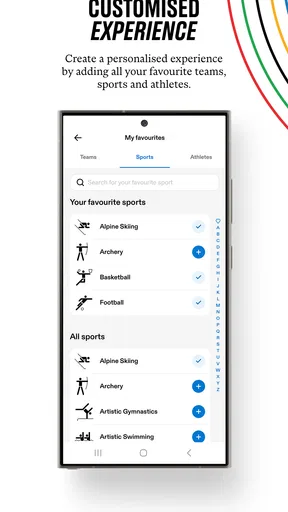
Not only can you follow your favorite sports, but you can also set personalized notifications. This means you’ll never miss a moment of the action, whether it’s the 100-meter dash or synchronized swimming. You can even get live updates, which is super handy if you’re on the go.
Features That Stand Out
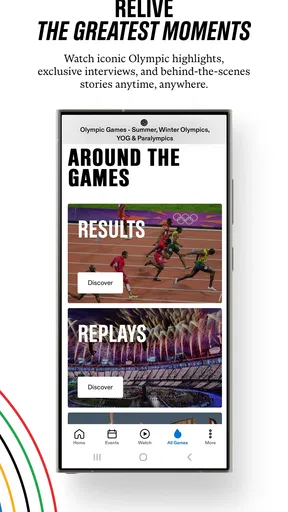
One of the coolest features is the interactive medal tally. You can track how your country is doing in real time. It’s pretty exciting to see those numbers climb as athletes bag more medals.
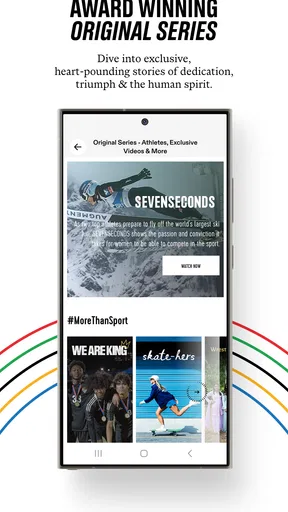
The app also has a neat section for athlete profiles. You can read up on their stats, achievements, and even some personal stories. It adds a nice touch of personality to the whole experience.
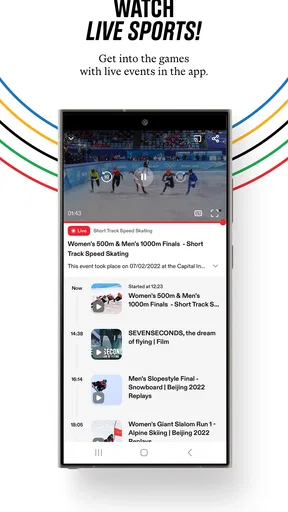
Oh, and let’s not forget the video highlights. If you missed a big event, no worries—you can catch up with high-quality videos. It’s like having your own personal sports channel.
Is It User-Friendly?
Absolutely! The app’s interface is super intuitive. Navigating through different sections feels smooth, and the design is clean and minimalistic. Even if you’re not tech-savvy, you’ll find it easy to use.
I also appreciate the customization options. You can tweak the settings to match your preferences, which makes the app feel more personal and engaging.
Final Thoughts
Overall, the Olympic Games™ app is a must-have for anyone who’s passionate about the Olympics. It brings all the excitement and drama straight to your device, making it easy to stay updated and engaged.
Whether you’re a die-hard fan or just someone who enjoys the occasional sports event, this app is sure to enhance your Olympic experience. So, go ahead and give it a download—you won’t regret it!
Pros
- Intuitive and user-friendly interface.
- Wide variety of sports to explore.
- Real-time updates on events.
- Immersive graphics enhance experience.
- Customizable notifications for events.
Cons
- Requires a stable internet connection.
- Ads can be somewhat intrusive.
- Limited offline features available.
- Some sports lack detailed stats.
- Initial load time can be lengthy.
FAQs for Olympic Games™
What platforms is the Olympic Games™ app available on?
The Olympic Games™ app is available for both Android and iOS devices. Users can download it from the Google Play Store or the Apple App Store, ensuring compatibility with a wide range of smartphones and tablets. It is designed to provide a seamless experience on both operating systems.
Can I watch live events through the Olympic Games™ app?
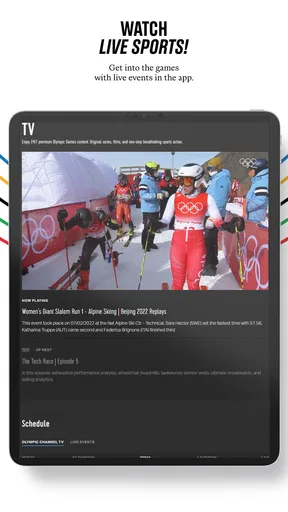
Yes, the Olympic Games™ app provides live streaming of various Olympic events. Users can watch their favorite sports in real-time, ensuring they don't miss any action. The app also offers highlights and replays for those who want to catch up on events they couldn’t watch live.
Does the app provide a schedule of events?
Absolutely. The Olympic Games™ app features a comprehensive schedule of all events, allowing users to plan their viewing. The schedule is regularly updated with real-time information, including start times and results, so you can stay informed about your favorite sports and athletes.
Is there a feature to track specific athletes or countries?
Yes, the Olympic Games™ app allows users to follow specific athletes or countries, providing personalized updates and notifications. This feature helps fans stay connected to their favorite competitors and receive the latest news, results, and medal counts directly related to their interests.
Are there any in-app purchases or subscription fees?
The Olympic Games™ app is free to download and offers many features at no cost. However, there might be premium content or features that require in-app purchases or subscriptions. Check the app's details in the store for specific information on any additional costs.


